How to activate Windows Server 2016 Evaluation - This edition cannot be upgraded –
This edition cannot be upgraded – How to activate Windows Server 2016 Evaluation
I found this post, it may help you activate your windows server.
Using Windows Server 2016 Eval edition, but meaning to install a Standard edition key.
Came here because the GUI activation failed when trying to change the Product Key.
This is what worked for me, running in Power Shell as Administrator:
Dism /online /Set-Edition:ServerStandard /AcceptEula /ProductKey:12345-67890-12345-67890-12345
The removal of packages was stuck at 10% for over an hour, but it eventually jumped to 88.5% and a few minutes later, it finished.
Rebooted, and it took about 10 more minutes of cleaning up.
Then, I had to run the GUI activation wizard again and type in the same Product Key in Control Panel --> System --> Windows Activation --> Change product key.
This time the GUI activation worked fine.
=====================================================
I happen to have more than a couple of dozens Windows Server VMs in my HomeDC, starting with Server 2003 and ending with (the gorgeous) Server 2016.
I tested 2016 along with various products (including XenDesktop, Horizon View, VEEAM) since I first got my hands on the Tech Preview 1 and as per today, I have close enough to 15 VMs running with the 2016 Evaluation version. I didn’t really wanted to reinstall EVERYTHING just because Windows doesn’t want to switch “automatically” from Evaluation to the new Product Version for which I had a license, so I started digging into DISM.

So, what’s to be done?
Open an elevated Command Prompt (Win+X, then A) and type:

At the end (yeah, it takes a while…), the process might request a reboot, so reboot your server and then check the Activation status.

PS: Not sure if this works for the Core edition. Didn’t had the time to test, but I guess it’s not working.
I tested 2016 along with various products (including XenDesktop, Horizon View, VEEAM) since I first got my hands on the Tech Preview 1 and as per today, I have close enough to 15 VMs running with the 2016 Evaluation version. I didn’t really wanted to reinstall EVERYTHING just because Windows doesn’t want to switch “automatically” from Evaluation to the new Product Version for which I had a license, so I started digging into DISM.

So, what’s to be done?
Open an elevated Command Prompt (Win+X, then A) and type:
DISM /Online /Set-Edition:ServerStandard /ProductKey:Your-VLK-Product-Key-For-WindowsStandard /AcceptEULANOTICE: If you have a Datacenter edition, you might need to set the edition to “ServerDatacenter” as it was the case for me.
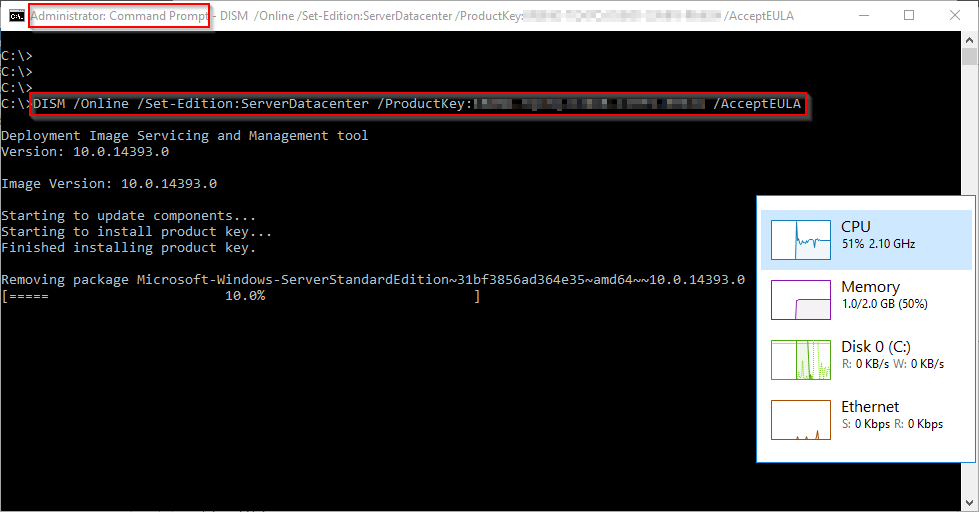
At the end (yeah, it takes a while…), the process might request a reboot, so reboot your server and then check the Activation status.

PS: Not sure if this works for the Core edition. Didn’t had the time to test, but I guess it’s not working.
Comments
Post a Comment