Hide Windows user account on login screen
How to Hide an Account in Login Screen on Windows 10/11.
In some cases and mainly for security reasons there is a need to hide an account on Login Screen on Windows 10/11.
When you share your computer with others, you may not want all of their accounts to appear on the login screen, or you may want to hide the account used to manage the computer from the login screen (e.g. the "Administrator"). If you're in a such a case, read the instructions below to learn how to hide specific users on login screen on Windows 10/11.

How to Hide User Accounts from Login Screen on Windows 10/11.
Method 1. Disable User Account in Windows 10/11.
The first method to hide a particular account from appearing on the login screen is to disable that account. This method is recommended in cases where you do not want a specific user to have access to the computer's resources, or you want to disable the Administrator account (if it is active) for security reasons.
Important: Use this method only if you want to completely disable the account and prevent it from connecting to the computer. If you want to keep a user account active, but hide its user name so that it does not appear on the login screen, see the instructions in methods 2 & 3 below.
1. At the Search box type cmd and then open Command Prompt as Administrator.
2. Inside the Command Prompt window, give the following command to list all the users in Windows.
- net user
3. Locate the account that you want to disable and prevent it to login to Windows and give the following command:
- net user username /active:no
e.g. To disable the "Administrator account give this command:
- net user administrator /active:no
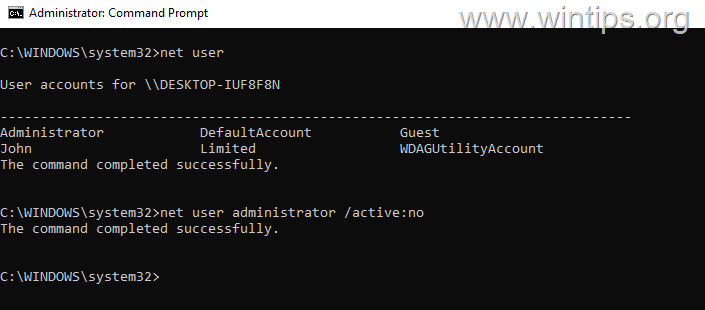
4. That's it! After disabling the user account, their username will not appear in the login screen and they will not be able to login in Windows. If you change your decision in the future, and you want to re-enable the disabled account, give the following command in command prompt admin.
- net user username /active:yes
e.g. net user administrator /active:yes

Comments
Post a Comment