Remote Desktop Service Error 126 Module not found
Remote Desktop Service Error 126 Module not found
When you attempt to start the Remote Desktop Services (“TermService”) service, Error 126 may occur. Here’s the complete error message:
Windows could not start the Remote Desktop Services service on Local Computer.

Error 126: The specified module could not be found.
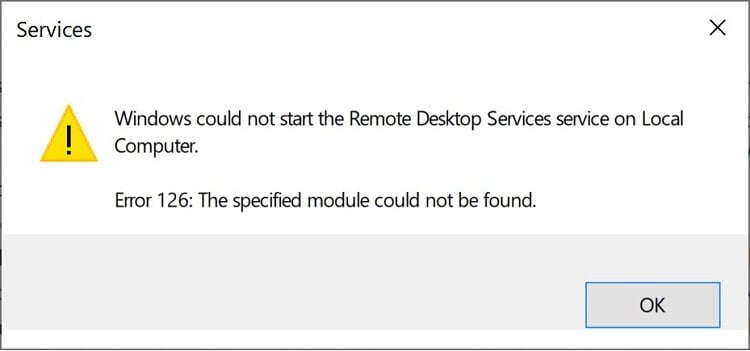
When you attempt to start the Remote Desktop Services (“TermService”) service, Error 126 may occur. Here’s the complete error message:
Windows could not start the Remote Desktop Services service on Local Computer. Error 126: The specified module could not be found.
Cause
The error occurs if the file termsrv.dll is missing or corrupted. Another reason could be that the Remote Desktop Services ServiceDLL may be pointing to a third-party module, such as “%ProgramFiles%\RDP Wrapper\rdpwrap.dll” (“RDP Wrapper.”)
The error occurs if the file termsrv.dll is missing or corrupted. Another reason could be that the Remote Desktop Services ServiceDLL may be pointing to a third-party module, such as “%ProgramFiles%\RDP Wrapper\rdpwrap.dll” (“RDP Wrapper.”)
Resolution
To resolve the Remote Desktop Services (“TermService”) service error 126, follow these steps:
- Open
Regedit.exe and go to:HKEY_LOCAL_MACHINE\SYSTEM\CurrentControlSet\Services\TermService\Parameters
- Double-click ServiceDll
- Set its data to %SystemRoot%\System32\termsrv.dll
(Also, ensure that the value type is REG_EXPAND_SZ instead of REG_SZ.)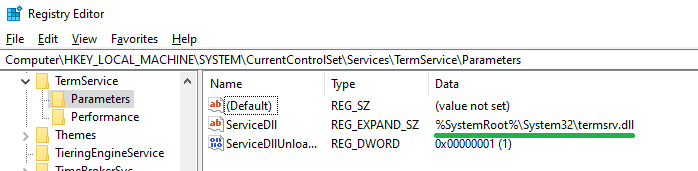
- Exit the Registry Editor.
To resolve the Remote Desktop Services (“TermService”) service error 126, follow these steps:
- Open
Regedit.exeand go to:HKEY_LOCAL_MACHINE\SYSTEM\CurrentControlSet\Services\TermService\Parameters
- Double-click ServiceDll
- Set its data to %SystemRoot%\System32\termsrv.dll
(Also, ensure that the value type is REG_EXPAND_SZ instead of REG_SZ.) - Exit the Registry Editor.
Check if termsrv.dll exists
Additionally, make sure that the module termsrv.dll exists in the C:\Windows\System32 directory.
You may check the integrity of the file by running the following command from an elevated Command Prompt:
sfc /scanfile=C:\Windows\System32\termsrv.dll
If the above file is missing and Sfc is unable to repair it, run the Dism command. Alternatively, you can restore the missing file from WinBIndex.
One of the above steps should take care of the issue.
Additionally, make sure that the module termsrv.dll exists in the C:\Windows\System32 directory.
You may check the integrity of the file by running the following command from an elevated Command Prompt:
sfc /scanfile=C:\Windows\System32\termsrv.dll
If the above file is missing and Sfc is unable to repair it, run the Dism command. Alternatively, you can restore the missing file from WinBIndex.
One of the above steps should take care of the issue.
Comments
Post a Comment