Setting the PowerShell Execution Policy
Solution
There are situations when you are executing a PowerShell script and it will give you the below error message:
At line:1 char:19
+ c:\scripts\regSvr.ps1 <<<<
The reason for the above error is a security setting built into Windows PowerShell called "execution policy". Execution Policy determines how (or if) PowerShell runs scripts. By default, PowerShell's execution policy is set to Restricted; this means that scripts will not run.
You can verify the execution policy setting by using the Get-ExecutionPolicy PowerShell command as shown below.
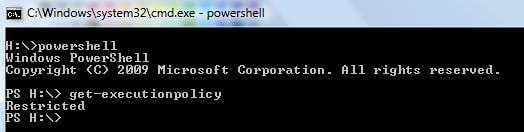
You can change the PowerShell script execution behavior using "Set-ExecutionPolicy". The Set-ExecutionPolicy cmdlet enables you to determine which Windows PowerShell scripts will be allowed to run on your computer.
Windows PowerShell has four different execution policies:
- Restricted - No scripts can be run. Windows PowerShell can be used only in interactive mode.
- AllSigned - Only scripts signed by a trusted publisher can be run.
- RemoteSigned - Downloaded scripts must be signed by a trusted publisher before they can be run.
- Unrestricted - No restrictions; all scripts can be run.
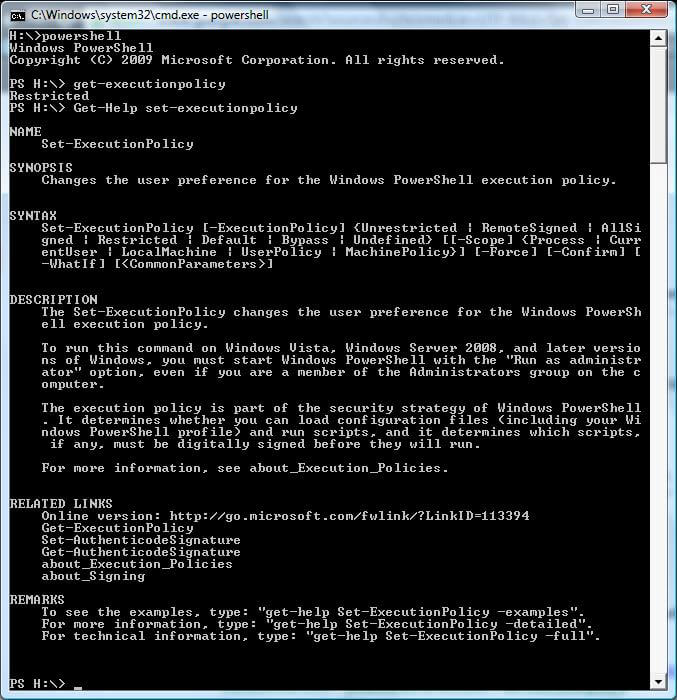
To get more information on Set-ExecutionPolicy, type "Get-Help Set-ExecutionPolicy" as shown below.
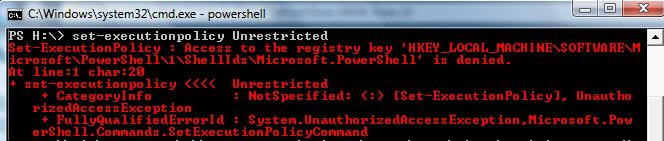
To execute the Set-ExecutionPolicy command, you must have administrator permission and for Windows Vista / Windows Server 2008 and later versions you have to open the PowerShell command prompt with Run As Administrator. Otherwise you will get the below error.
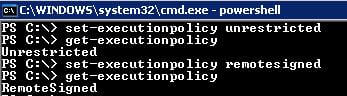
You can set the execution policy as per your requirement as shown below.
get-executionpolicy
--or
set-executionpolicy remotesigned
get-executionpolicy
Comments
Post a Comment